Friday, March 8, 2013

RoboCar - An Album

It has been quite a while since I posted about my RoboCar, my autonomous dream

I decided to make this post as an album of all pictures I've got relating to my RoboCar

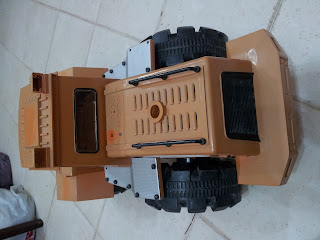
Currently, I am using the orange car (truck, better said) you see below. I've already designed and ordered PCBs which represents an awesome Control System with dedicated functionality cards. This will form my Autonomous Dream.


RoboDoor

Hello There!


Long time no post, though I had done many things, for a reason or another, I am addicted to RoboThing, I have RoboCar, RoboDoor, RoboGardener. Today I am gonna post about my RoboDoor!


The concept is simple, use an RFID tag to enter the room, an emergency entry should be implemented to prevent locking the door permanently (a UPS will be considered at a later stage)


So I started off with a Solenoid actuator which I got from Sparkfun for 15$, the solenoid is rated for 36v however, it works just fine at 12v.

I decided to use an ATX power supply to provide the 12v and 5v for my system.

I made some measurements and then cut some wood and fixed in the solenoid (Sparkfun 4-40 screws works amazingly)


One important thing here is that I should guarantee that I will not get locked outside my room, so there must be an emergency entry method if the microcontroller or RFID fails


Remember that later on, a UPS will be added at a later stage, so cutting power from the room circuit breaker will not work.

I decided to use a discrete "Discharge Circuit" where-in you hold the door handle for say 20 seconds which would discharge a capacitor and activate a relay contact to open and cut the power from the solenoid.


Drawn using Digi-Key SchemeIt


I added a Micro-switch which would activate when you fully press the door handle, the pot is set to give 5v, the capacitor charges very fast when you release the handle and discharges slowly through the 100Kohm and takes about 20 seconds to activate the output of the comparator which would cut the power from the solenoid.


Yes!! emergency entry works, now, next step is the RFID

I decided to use ID-12 RFID because it is mid-range and suitable for my need, I bought them from Sparkfun as well

I did some testing before adding up the RFID system, luckily, the tag reader can transmit and receive through the door which made things even awesomer :)

I first added a little indicator LED and a key switch


Then, I added the MCU circuit, I used ATmega328


The RFID module is awesome, you only need to connect up +5v, GND and you get the serial data outputed which you can read in your micrcontrollers


The output data is formatted as follows (details in datasheet)

STX,ASCII CODE,CHECK SUM,CR,LF,ETX

STX: Start of Text (0x02)
10 ASCII Char (5 Hex bytes) This is the unique tag ID
2 ASCII Char (1 Hex Byte) Check Sum of tag ID
CR: Carriage Return (0x0D)
LF: Line Feed (0x0A)
ETX: End of Text (0x03)

lookup the ASCII table to know more about STX, CR, LF, ETX

I did not bother about check sum as I really dont know what it is exactly, I just checked for the 12 char matching in my code


Adding a lil circle on the location of the RFID tag reader makes accessing the door easier as you dont have to scan your card through the entire door!


One thing still needed some work, which is the fact that I used a 5 second delay after reading and accepting the tag. After the 5 seconds, the lock will activate even if the door is open, which is bad!
If the solenoid is extended and someone tries to close the door, the solenoid could be damaged.
Therefore, a reed switch and a piece of magnet made things more organised.

The magnet will activate and close the contacts of the reed switch only when the door is closed.


Too many wires! needs some orgnizing


A final test on the system functionality


------------
Update:

I found that the solenoid becomes really hot after some time, therefore, a cooling was required

I used a 12v brushless fan (PC fan), it works great for keeping the solenoid clean


Note: I added a wire mesh for hand protection ;)


Here is the code on GitHub

End of Code


Tuesday, December 18, 2012

Experiment #45651 - 8A Current on pencil

Playing electrical is an awesomeness, it is a joy that never stops, and today, for a reason or another, I thought of measuring the resistance of:


Yea, pencil lead

The reading varied from one piece to another, but the important thing is that the range was 1.5-3 Ohm, which means

IT IS TIME FOR FUN

MUWAHAHAHAHA


You ask why I say this?

well, Ohm's law says that the less resistance you have, the more current will flow, in other words

I = V/R
I: Electrical Current in Ampere
V: Voltage in volts
R: Resistance in Ohm

Time for Aperture Science!!!


In the picture above, I have connected a 12v source to an Ammeter (Black multimeter on left side) and then to two alligator clips which you see in the middle of the screen in green and white

A second multimeter (green) connects to a Thermocouple to measure temperature (you can see a white wire with little black at the end going between the two alligator clips, the temperature is now 22 deg C as you see in the picture


And then, I turn on the  12v supply


Pencil leads are made of graphite, which is a carbon material, it is a semimetallic material and hence has low resistance, as it heats up with the current, it burns out and its resiatance increases till the graphite is conaumed


Friday, August 17, 2012

RoboCar: A Robotic Awesomness

Robotic Cars are truly full of awesomeness, it is a world full of engineering, design, challenges, coding, components, datasheet, hardware and reverse engineering sometimes.

It is about transforming a simple 10$ RC car


To XBee enabled, sensor armed, camera monitored, MCU + Steering Wheel + Brake/Acceleration Pedals controlled awesomeness


Photos after fixing IR Proximity Sensor/ Headlight LEDs/ Camera


My plan is to build a remotely controlled car from a base station 


So, first thing I started disassembling the poor car


And the control electronics to be replaced as well


Instead of the PCB, I've added a breadboard with an ATmega328


And installed a 1.5m range IR proximity sensor from sparkfun


and through in some code, the result:


 #include <avr/io.h>  
 #include <USART.h>  
 #include <util/delay.h>  
 #define SETBIT(ADDRESS,BIT) (ADDRESS |= (1<<BIT))     //Macro to set an individual pin  
 #define CLEARBIT(ADDRESS,BIT) (ADDRESS &= ~(1<<BIT))     //Macro to reset (clear) an individual pin  
 void init_ADC(void);  
 uint8_t ADC_read(uint8_t pin);  
 int main (void)  
 {  
      DDRB=0xFF;     //PORTB as output  
      DDRD=0xFF;     //PORTB as output  
      //PB0-PB5 + PD6 + PD7 are used for the 8-Bit DAC, PB6 & PB7 are used for XTAL  
      init_ADC();     //Setup ADC  
      uint8_t VAL;//Used to read ADC value  
      for (;;)  
      {  
           VAL = ADC_read(0);     //Read ADC Value; (connected to PC0)  
           PORTD=VAL;     //Output the 8-bit number through PORTD (8-Bit Port)  
           SETBIT(PORTB,PB0);     //PB0 connected to WR signal, DAC read the data on WR rising edge  
           CLEARBIT(PORTB,PB0);// Prepare for next reading  
      }  
      return 0;  
 }  
 void init_ADC(void)          //Prepare ADC Module  
 {  
      DDRC = 0x00;  
      PORTC= 0x00;  
      ADMUX |= (1<<ADLAR);     //Input from ch.0 , reference is taken from AREF pin, Left Adjusted Result  
      ADCSRA |= (1<<ADEN) | (1<<ADSC);     //Enable ADC, Start Conversion, no CLK prescaling  
      loop_until_bit_is_clear(ADCSRA, ADSC);  
 }  
 uint8_t ADC_read(uint8_t pin)     //Read an 8-Bit ADC  
 {  
      ADCSRA |= _BV(ADSC);  
      loop_until_bit_is_clear(ADCSRA, ADSC);  
      return ADCH;  
 }  


Original Signal


Signal out of ADC


On the screen...


[ To be Continued]


Saturday, April 28, 2012

HD44780 Custom Character Generator - Update

Yeaaaaaaaaaaa, HD44780 CCG  gets an update

I've added a Menu which enables saving and loading


you can save files in "ccg" extensions

here is an example "HappyFace.ccg"


Download the new version (V1.001) of HD44780 Custom Character Generator

github: https://github.com/MuazSalah/HD44780_CCG

Friday, April 27, 2012

HD44780 Custom Graphics Generator

Previously, I used to use Sparkfun's serial LCD, which is really neat and very easy to use, however, it is a lil buggy sometimes and the PCB takes wider space. So, I decided to go back in time and use the bare LCD with HD44780 controller (also I got it from sparkfun).

So After I got it, my plan was to write my own code to drive it, but then my laziness beat my excitness :P

Searching in the web, I came across this really awesome and very easy to use library from Peter Fleury to drive the LCD which I tried and liked. It is really awesome to get started with these LCDs

On the example code, he shows how easy it is to create a custom character eg.: the Copyright symbol by simply defining the 0s and 1s (for this specific example two character cells are required, hence two lines)


static const PROGMEM unsigned char copyRightChar[] =
{
    0x07, 0x08, 0x13, 0x14, 0x14, 0x13, 0x08, 0x07,
    0x00, 0x10, 0x08, 0x08, 0x08, 0x08, 0x10, 0x00
};


so I decided to make it even easier, I made a visual basic program :)


you only need to dray on the Image area by clicking on individual pixels


The result is displayed on the Preview area, and the actual code is on the text box, very simple!


same as the above picture but inverted :D

It doesn't look like a heart? yea, excuse my drawing abilities


yea, Arabic as well :D

You can download the program form here